Manage Data Where It Lives with Databricks Apps

As organisations scale their data estates, more and more of the day-to-day work shifts from building new pipelines to managing, maintaining, and governing the ones that already exist. Someone has to check that yesterday’s load ran cleanly and that a schema change didn’t silently break a downstream report. Databricks Apps address this need by providing lightweight, governed applications that run directly inside the Databricks workspace. They turn data products and models into interactive tools without exporting data to external systems, while maintaining strong governance guardrails.
Databricks apps are designed for operational workflows: monitoring pipeline health, validating data quality, handling schema changes, coordinating approvals, and providing safe interfaces for business users to interact with data. They are especially useful for self‑service tasks, such as curated access and approval flows tied to governance controls. These apps provide a governed, in-workspace interface to perform operational tasks. Teams can also use Databricks Apps to monitor pipeline health, run self-service data quality checks, detect anomalies, track cost and usage, support metadata stewardship, and give business users safe, curated access to data, all while preserving the security, lineage, and permissions the platform already provides.
What Databricks Apps Are and Why They Matter
Databricks Apps are web applications that are deployed directly to the Databricks environment. They allow teams to transform repeatable data workflows like governance decisions, quality gates, and operational tasks into user-friendly interfaces that minimise manual interventions and reduce risk. Instead of ad-hoc notebooks or SQL queries, you can provide structured “front doors” for business users, data stewards, and engineers: a way to run controlled approval flows, governed data edits, and self-service operations that fully respect Unity Catalog permissions and auditability.
Databricks positions Apps as a way to quickly build secure data and AI applications using familiar Python frameworks like Dash, while keeping deployment and maintenance overhead minimal. For Databricks, they are the natural next step towards an end-to-end data platform that covers every step from data ingestion through transformation, data quality, and governance to BI and operations.
What These Apps Look Like in Practice
Apps serve as controlled, governed interfaces for processes that would otherwise require direct data access or informal approvals. Common examples include:
- Approval workflows for governance decisions:
- Self-service access control portal
- PII (Personally Identifiable Information) data classification, tagging and anonymisation based on engineering, business and GDPR requirements
- Quality gate dashboards that validate data before promotion
- Self‑service operational tools enabling business users to interact with curated processes without using notebooks or SQL
- Governance toolkits like Ontos, a data contract and data product governance platform built and maintained by Databricks, which follows the open source ODPS and ODCS standards to unify how businesses buy, manage, and scale data products.
A Key Architectural Detail: The Read/Write Access Pattern
Effective governance hinges on how the app interacts with data. Databricks Apps allow you to implement a hybrid access pattern:
Both the access to the app and the read operations inside the app occur “on behalf of” the authenticated user, leveraging their individual permissions. Unity Catalog permissions apply automatically, ensuring data access is consistent and traceable. This also ensures that data masking and row-level security rules work consistently across the platform.
Writes are performed via a dedicated service principal, allowing updates only through the app’s validated business logic, while recording who initiated the change for full auditability.
A Few Examples
Let’s explore some examples of how Databricks Apps can enhance common data operation patterns that would otherwise require elevated privileges and additional audit trails.
Manual Data Adjustments with Approval Process
Wherever approval processes or manual data adjustments are needed, apps can provide an interface for non-technical users.
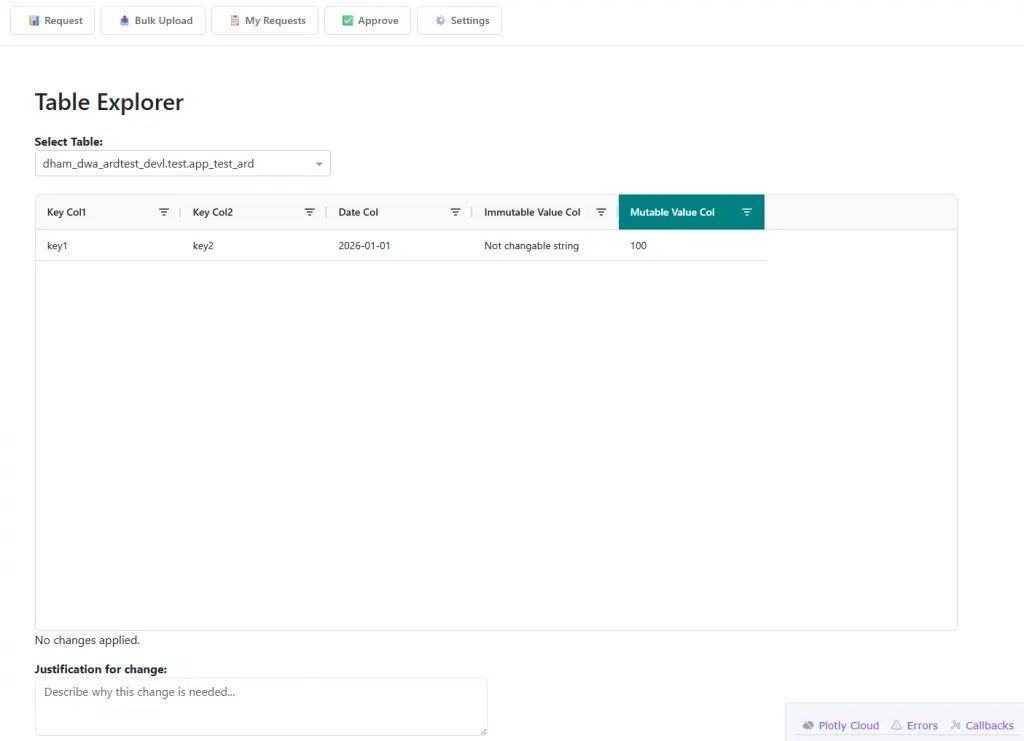
In this example, an app lets users manually adjust KPI factors applied during data processing. Without the app, these adjustment factors are provided via CSV or Excel files. While manual file transfer works, it is error-prone, especially due to localisation issues and user error.
1. Request tab
The requester selects an attribute, loads reference data into a grid, edits only permitted fields, previews changes, and submits a “Change Request”. The system records all relevant metadata (requested_by, requested_on, comments) associated with the request. Only columns configured in a YAML file are open for changes, and these editable columns are highlighted in the UI. Once a change request is approved, the changes flow back into the ETL pipelines based on their original keys.
2. Bulk Upload tab
The user can upload a full CSV or Excel file to populate the platform with data manually. The system checks the data structure and compliance with the expected schema, and the user instantly receives feedback on any issues on the same page.
3. My Requests tab
Requesters can track each submission, with its status derived from approval metadata.
4. Approve tab
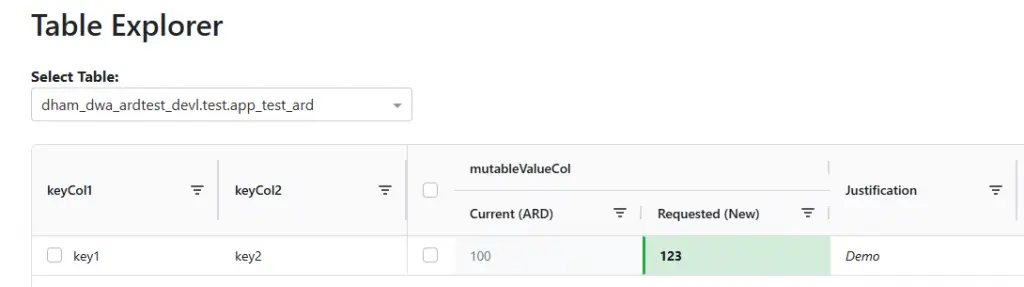
Approvers only see requests submitted by others, enforcing the four-eyes principle. Approvals capture approver metadata and may trigger downstream processing or notifications. Current and proposed entries are displayed side by side for visibility. Approvers can select individual rows to approve. On approval, reprocessing of the downstream pipeline starts automatically.
PII Data Classification, Tagging and Anonymisation App
Strong data governance plays a key role in GDPR compliance and the handling of PII, and it ties in closely with a business’s data strategy. The discovery and classification of such data in particular is tedious and often manual.
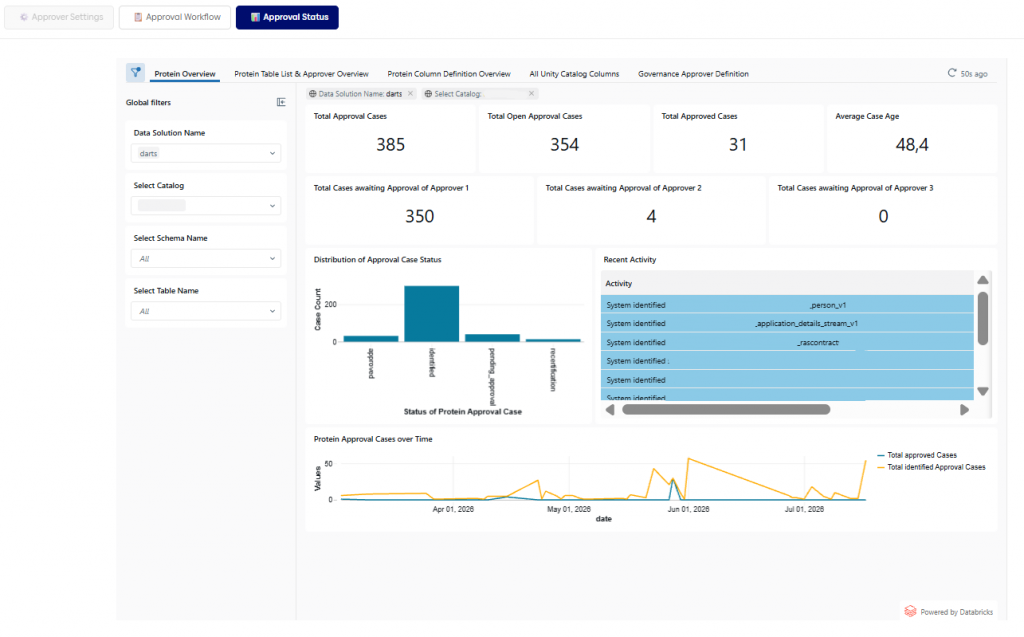
This example is another approval workflow app. It standardises how organisations identify, validate, and approve sensitive data in Databricks Unity Catalog. The app ensures that data is tagged based on compliance needs before masking, hashing, and related rules are applied. Administrators configure approvers at the project level, while reviewers process assigned approval cases via a guided workflow. The workflow captures table context and enforces column-level classifications, categories, and anonymisation settings. Built-in guardrails prevent invalid classification/category combinations and support the discovery of missing tables or columns. Finalising the process applies governed tags to tables and columns. A governed tag is an account-level tag set up by administrators. Governed tags can be used to enforce policies or custom rules for attribute-based access control (ABAC) or to flag data based on GDPR requirements.
Databricks Labs’ Ontos
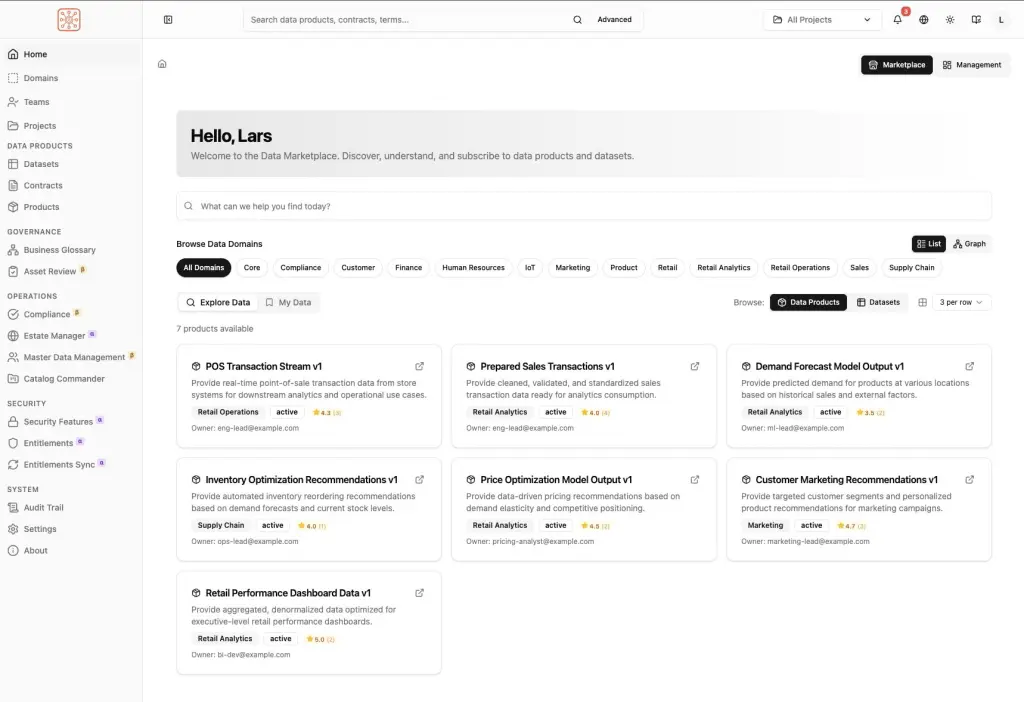
Ontos is a Databricks Labs project that adds a business governance and semantic layer on top of Unity Catalog. Its goal is to help organisations move beyond technical metadata (tables, schemas, lineage, permissions) and manage the business meaning, ownership, quality, and lifecycle of data products.
Built in React and directly integrated with Databricks Unity Catalog, with Databricks Lakebase as a fast storage layer, Ontos offers a range of data governance features:
- AI-assisted data discovery
- Data product management
- Business glossaries
- Data contracts
- Semantic/ontology management
- Stewardship workflows
- Data marketplace capabilities
Bottom Line
Databricks Apps extend the Lakehouse beyond analytics by bringing governed operational processes directly into the Databricks platform. They enable organizations to build secure, user-friendly interfaces for approvals, data stewardship, quality management, access requests, and governance workflows without moving data outside the platform. By combining user-based read access with controlled write operations, Databricks Apps help enforce compliance, improve auditability, and reduce manual effort while preserving Unity Catalog security, lineage, and governance standards. Whether supporting approval processes, PII classification, or broader data product governance through solutions such as Ontos, Databricks Apps provide a practical way to turn governance from a manual burden into an integrated, scalable operating model.