Compile your Knowledge Base into a LLM Wiki

There is documentation. Somewhere.
Teams accumulate knowledge faster than they organize it, and most of it is hard to find when someone actually needs it. At a data-platform customer, the platform team keeps a solid knowledge base for the developers who build data products on it. But that covers the platform itself. Shipping a data product also means managing AD groups, working with the GitOps stack, and consulting the enterprise architecture catalog. Those docs live elsewhere: other Confluence spaces, ServiceNow articles, the READMEs of reference projects. Cross-references are often missing, especially across tools. So finding the right information is hard, especially during onboarding — and when search fails, the default is a ticket to the platform ops team. The problem doesn’t fade with experience: even senior developers struggle to keep up. None of this shows up as a budget line, but the cost is paid on every onboarding and every change.
Why today’s tooling falls short
The recent wave of LLM tooling promised a fix. Retrieval-augmented generation (RAG) embeds chunks of the docs and retrieves them at query time. The Model Context Protocol (MCP) lets the model fetch live pages on demand. Both leave synthesis to query time. RAG returns chunks without context, because it starts from scratch on every query. MCP solves a different problem: fetching live data, not compiling it.
What neither does is prepare the knowledge in advance: compile it once, cite every claim, link related ideas explicitly. Andrej Karpathy named that pattern an LLM Wiki in April 2026. The rest of this post is what an LLM Wiki is, where it earns its keep and where it breaks, and how we served one from Snowflake — mirrored by a public scaffold you can clone and run.
wikilink support.Compilation beats re-synthesis
Karpathy’s framing is a software-engineering analogy: compilation beats re-synthesis. A compiler turns source into a binary once; you do not re-compile on every run. An LLM Wiki applies that to knowledge. The LLM reads the raw sources and synthesizes them into curated Markdown pages, linking related concepts and surfacing gaps and contradictions. From then on, you query the wiki — not the raw sources.
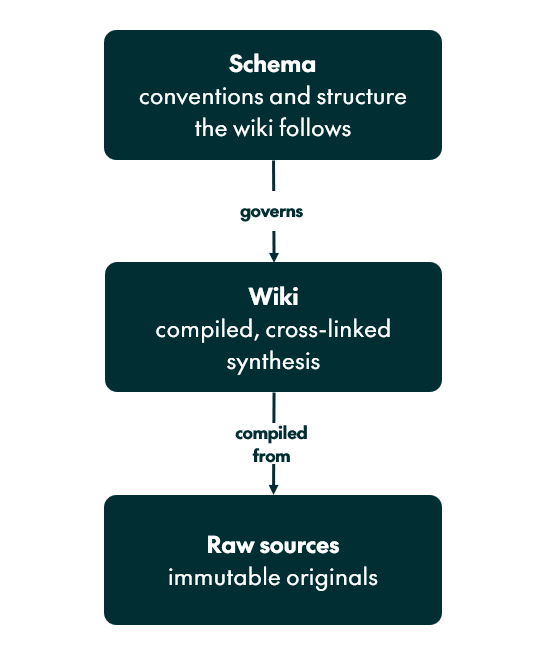
A working wiki has three layers. Raw sources — the scattered tools from above — sit in folders the LLM only reads. The wiki is a parallel folder of Markdown pages, one per concept, with explicit [[wikilinks]] between related topics. Because the LLM owns the wiki entirely, it creates pages, updates them, and records where each claim came from. The schema — a single AGENTS.md file — tells the LLM how to structure the wiki and what each page should contain.
Concretely, that is three places on disk:
knowledge-wiki/
├── AGENTS.md                    # the schema: how the agent maintains the wiki (you own this)
├── raw/                         # immutable copies of every source; the agent only reads here
│   ├── confluence/
│   ├── servicenow/
│   └── repos/
└── wiki/                        # the curated knowledge base; the agent owns it
    ├── index.md                 # the hub every page links back to
    ├── concepts/
    ├── decisions/
    ├── runbooks/
└── sources/ # one record per source: its URL, date, and the pages it touchedKeeping it current takes four operations: ingesting new sources into pages, answering questions from the wiki alone, linting for stale or orphaned content, and refreshing pages after sources change.
What a curated wiki page looks like
Every wiki page opens with a frontmatter block: tags, a status field, and a last_updated date. Concept pages use a maturity status — stub, growing, mature — that advances as other pages cite them. Decision pages use their own vocabulary: proposed, accepted, superseded. The lint operation reports drift automatically. For example, if a mature page drops below its citation threshold after a refresh, lint bumps it back to growing.
Take one page — decisions/use-hidden-partitioning, from a tiny, public example wiki compiled from two Apache Iceberg docs (partitioning and partition evolution). It contains three [[wikilinks]] to related pages, plus two source citations at the bottom, so every claim is traceable. Each source citation links to a source page — a wiki record carrying the original URL, the ingestion date, and the list of wiki pages updated from it. Follow the link to read the original; re-run the ingest to pick up changes. This decision record captures why hidden partitioning beats the Hive-style approach: the problem context, the rationale from the Iceberg docs, and the tradeoffs accepted.
The raw Apache docs behind it are a single flat page: no internal links, no metadata, no record of why the design was chosen. The curated record keeps just the choice, the consequences, and the sources.
Here is that page, lightly abridged:
---
tags: [decision]
status: accepted
decided_on: 2013-01-01
last_updated: 2026-05-27
---

# Use Hidden Partitioning Over Hive-Style Partitioning

## Context
Early big-data table formats implemented partitioning as user-visible columns.
Three classes of bugs were endemic: silent data corruption from incorrect
partition value formats, silent full-table scans when readers omitted the
partition filter, and query breakage when the partition scheme changed.

## Decision
Iceberg tracks partition specs inside the table's [[Table Metadata]], not in
the user-facing schema. Writers supply data for logical columns only.
Readers write predicates against logical columns; the engine translates them
internally. This is referred to as [[Hidden Partitioning]].

## Sources
- [[sources/iceberg-docs-partitioning]]
- [[sources/iceberg-docs-evolution]]
- [[sources/iceberg-docs-reliability]]
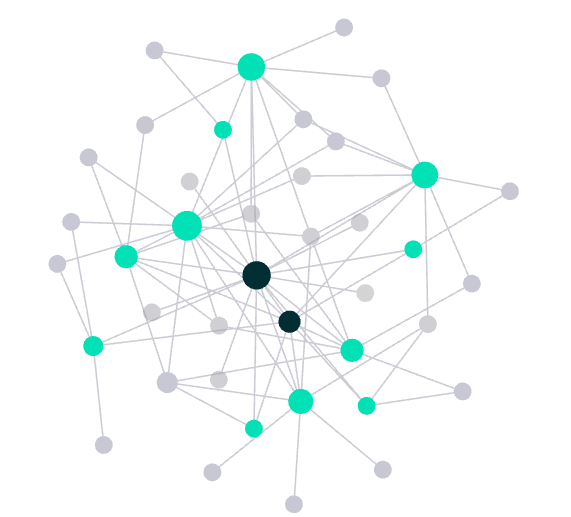
Scaled up, a wiki forms the graph this post opened with: each dot a page, each line a [[wikilink]]. What was scattered across separate documentation pages is now cross-referenced and traceable in one place.
RAG, MCP, and the wiki — complementary, not competing
The obvious objection is that this is just RAG with extra steps. Those extra steps are the point. At serving time the wiki is indeed retrieval — a Snowflake search service, later in this post — but it retrieves over compiled, cited pages rather than raw chunks. All three approaches differ less in how they retrieve than in what they retrieve from.
What each approach retrieves over
RAG operates on raw chunks at query time, so source attribution stays weak — a document reference, not a per-statement citation. MCP fetches live pages, but the answer lacks synthesis. The LLM Wiki sits between the two: knowledge is compiled in advance, so the wiki bakes in cross-references and citations, and freshness becomes incremental rather than per-query.
RAG still wins at millions of documents, hard latency requirements, and fully unstable content. The wiki wins at focused, stable knowledge bases — team wikis, research domains, governed knowledge surfaces. Its edge over raw-page RAG is the per-statement attribution in the table below: every claim traces to a source, which makes answers auditable.
Which tool for which job
MCP and the LLM Wiki are complementary, not competing. MCP is for live operations: open a ticket, fetch the current incident. The LLM Wiki is for stable knowledge: explain a concept, or trace a decision back to its source. dbt Labs, for instance, recently added tools to its MCP server that let an LLM pull from dbt’s documentation on demand. That works well when a query is a lookup — fetch the right canonical page and you are done. The wiki is the better fit when answering takes real synthesis — reconciling several pages into one coherent answer. The deciding factor is how much synthesis a query needs, not how many sources you have.
| RAG | MCP | LLM Wiki | |
|---|---|---|---|
| Synthesis | Per query | None | Compiled once |
| Source attribution | Chunk ID | Page URL | Per statement |
| Cross-references | None | None | Baked in |
| Freshness | Per query | Live | Compiled cadence |
| Best for | Large, unstable content | Live operations | Focused, stable knowledge |
So the wiki and RAG are not rivals at serving time. At scale the wiki is served via retrieval; every retrieved unit is simply already a synthesis with its citations attached. An informal test put the compiled corpus ahead on questions spanning several sources, and roughly even with raw pages on single-page lookups — the serving section has the detail.
Where it falls short
Synthesis can lose detail: Compiling many pages into one means leaving things out. Answers come from the compiled wiki, not the raw sources, so a detail dropped during synthesis is gone at query time — and, like any LLM step, synthesis can introduce errors of its own. Per-statement citations make a page auditable after the fact, and lint catches some drift, but neither prevents a lossy or wrong page up front. Spot-checking compiled pages against their sources stays necessary.
It only pays when synthesis does: The wiki’s value is the synthesis it bakes in. If your users’ questions are point lookups — fetch one page, read one value — that synthesis goes unused, and raw-page RAG or MCP-on-docs answers just as well. The wiki pays off when answering means pulling several pages together, not when it means finding one.
Staying current has a cost: The wiki is compiled, not live. Keeping it current means recompiling, and recompiling often enough to track a fast-moving source costs real time and tokens. In fast-changing domains or live incidents it will lag. The fix is to split the work: the wiki for stable knowledge, MCP for live operations.
These limits point the same way: the wiki is worth the effort when knowledge is stable and answering takes synthesis. Once it exists, the next question is access — a queryable interface for end users, a dev tool for engineers.
Serving the wiki from Snowflake
The wiki lives in Git. A coding agent with the repo checked out can already query it — that is the simplest way to use one. But that asks everyone to clone the repo and know how to point an agent at it, and it does nothing for non-technical users. To reach everyone, the wiki has to be served somewhere: a chat interface for non-technical readers, and a hosted endpoint that engineers and their coding agents can call without each cloning the repo. Snowflake offers the tools for that, and is what we used — the wiki sits next to the governed data, and search, agents, and access control come built in. It is one instance of the broader Snowflake-as-GenAI-platform story.
The pipeline
Getting the wiki into Snowflake is the easy part. Snowflake’s Git integration can pull the repo directly; in our test we instead published the Markdown to a cloud-storage stage, to work around access limits in the environment. Either way, a scheduled job loads the pages and indexes them for Cortex Search, re-processing only what changed.
The step that needs care is chunking. Cortex Search embeds a text column for semantic search but truncates anything past its embedding window — about 512 tokens, roughly 385 words — so a whole page indexed as one row would lose its tail. The job therefore splits each page into smaller chunks. Split naively, though, and a chunk loses its page’s frontmatter and source links, and the citation trail breaks. So the job carries each page’s metadata and citations into every chunk — a retrieved chunk can still name the page and source it came from.
The same approach is mirrored by a public scaffold of SQL scripts you can read end to end: the input tables and a sync procedure that parses each page’s frontmatter and chunks it, the Cortex Search service, helper UDFs that resolve [[wikilinks]], and the Cortex Agent that answers over them. Clone cortex-kb-scaffold, point it at a stage of Markdown, and you get the pipeline described here.

Reaching the agent
On top of the search service sits a single Cortex Agent — the thing users and tools actually talk to. It answers from the wiki, follows [[wikilinks]], and returns the source citations attached to each chunk. That one agent serves everyone two ways: non-technical users chat with it in CoWork (formerly Snowflake Intelligence) inside Snowsight, and engineers reach it from Cortex Code (since rebranded to CoCo, Snowflake’s coding agent) or any app over its REST API — a setup teams already run over raw sources alone, no wiki in between. It is the same agent and the same citations either way, with no separate identity layer. And because it is all Snowflake objects, the same roles that gate the rest of the platform govern access — no bolted-on permission layer for the wiki.
Serving it this way also makes the compilation step easy to test. An informal comparison ran the same Cortex Search service over a wiki compiled from part of a real knowledge base, then over that source’s raw pages. On questions whose answer spans several sources, the compiled corpus answered with fewer tokens, lower latency, and comparable correctness. On plain single-page lookups the two were close, sometimes with a slight edge to the raw pages.
When to use it, and how to start
The pattern fits a specific shape: stable knowledge where answering a question takes real synthesis, onboarding is a recurring cost, and answers have to trace back to a source. If your team sits between a RAG bot that returns scattered chunks and a ticket queue, a curated wiki can fill the gap. It does not fit every case. For point-lookup questions — or a single canonical source you can hand an agent directly — raw-page RAG or the dbt-style MCP-on-docs pattern is simpler and just as good. For very large, real-time, or fast-moving content, RAG or MCP wins.
Karpathy’s gist is the original concept note — enough to build one from scratch. If you would rather not start from a blank folder, I keep a wikiseed template: the file layout shown earlier, the AGENTS.md schema that tells the agent how to maintain the wiki, and the skills that run the loop. No CLI and no build step — just Markdown and an AI coding agent. Getting started takes two steps:
- Get the files. Use the Use this template button (or
git clone) to create a folder you name. - Initialize. Open it in Claude Code, GitHub Copilot, or Cortex Code and type
initialize the wiki. It asks for your wiki’s name, domain, and categories, then clears the example pages so you start clean.
From there the loop is three plain-language triggers: Ingest <url> pulls a source into raw/ and synthesizes pages from it, Query: <question> answers from the wiki with citations, and Lint the wiki flags stale or orphaned pages. Point it at your own docs, and the wiki fills in.