Hyperion Financial Management and Azure Databricks

Oracle’s Hyperion Financial Management (HFM) is a cornerstone for global financial reporting. It enables consolidation between entities of the company while maintaining a regulatory filing to General Ledger (GL) audit trail [1]. Within insurance agencies, these statements are vital for reserve building, price structuring, and strategic decision-making.
Previously, extracting this data for reporting was a manual, repetitive task prone to human error. Synvert’s goal was to automate this transfer from HFM to Azure Databricks, transforming a bottleneck into a streamlined, scalable data pipeline.
Understanding the HFM Data Landscape
HFM data is multidimensional. For example, a single entry might represent a posting on an account, for a legal entity at the start of a period. This example shows only a few of the available dimensions within HFM. The dimensions – such as entities and accounts – are organized into hierarchies:
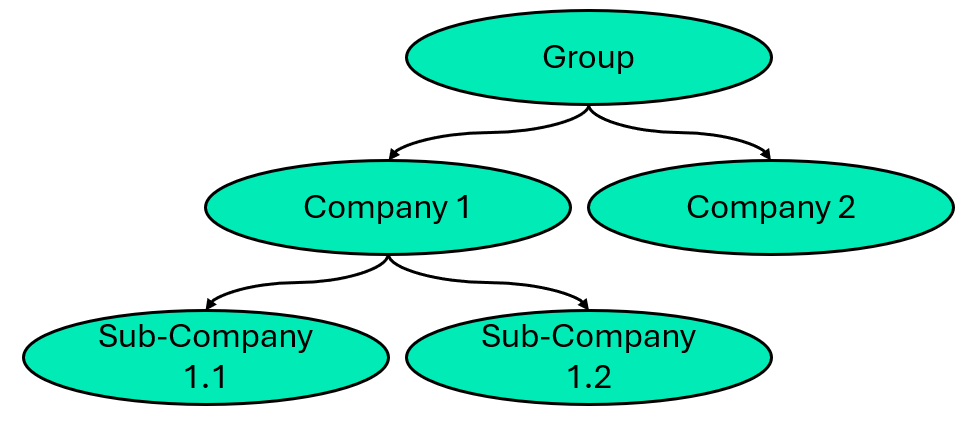
Level 2: Regional Companies (e.g., EMEA, Americas)
Level 3 (Leaves): Specific market-level sub-entities.
Unlike some systems, HFM allows entries at both the leaf level and at parent nodes (e.g., group-level adjustments). Capturing this nuance is critical for accurate reporting.
The problems of the past and future benefits
There are several use cases for exporting HFM data into Azure Databricks, like automation of calculations and reporting. This is especially relevant for a standardization of the reports. E.g by migrating from Microsoft Office Excel exports to a designated reporting software like Microsoft PowerBi for comprehensive visualisations and analyses.
Previously the extractions from Hyperion Financial Management were done either with the help of Microsoft Excel Extensions or directly in Hyperion Financial Management. Exporting Data from within Hyperion Financial Management requires the manual selection of the scope for each dimension. This creates a monotone repetitiv task which is prone to human errors.
Both procedures require users to be setup in Hyperion Financial Management. These users need permissions and governance for their access. Within Azure Databricks or Mircosoft Power Bi one may rely on a centralized identity provider like Microsoft Azure Entra ID. This ensurs a consistent governance of user accounts across systems with in the organization.
The Path to Automation: MerlinXL and API Integration
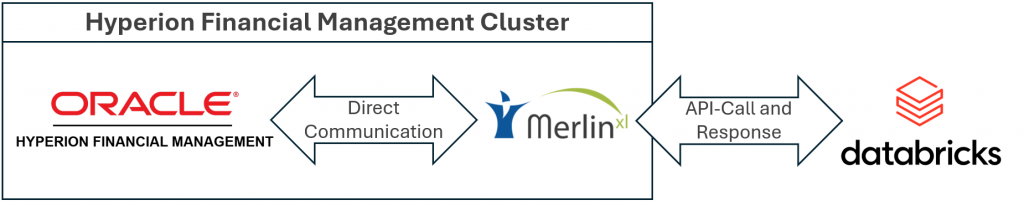
HFM does not offer a native “out-of-the-box” connector to Azure Databricks. To bridge this gap, we utilized MerlinXL by Amosca. [2]. The MerlinXL connector provides an API interface, where we define the type and scope of the data to be extracted and recieve the requested data on the Databricks cluster.
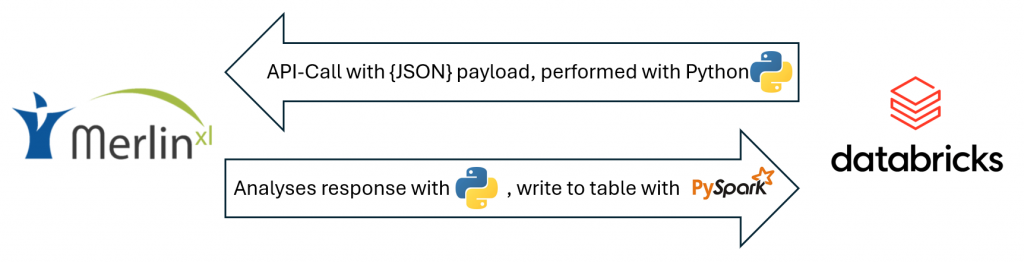
The MerlinXL connector accepts configurations as payloads in the JSON format. In short this enables to configure a multitude of settings, e.g. the output type of the requested data and definition of the extraction scope along each dimension. With this in mind we prepare the payload within a notebook in Databricks and perform the API call. The connector returns the data according to the configuration of the payload. We extract the data from the response object and use pySpark to cast and write the data into a staging table.
Configuration and Selection
The payload must contain selection definitions for each dimension. There are four types of selections, which can be concatenated for a combined selection of values:
| Selection Type | Description |
| Specific Node | Extracts data for a single member only. |
| Leaf Nodes | Extracts only the base-level children. |
| Descendants | Extracts the node and all downstream members. |
| [None] | Aggregates all nodes along the dimension. |
Further options include the selection of the return format. We use either the CSV or JSON format, depending on the specifics of the returned data, to minimize data volume and thus network traffic.
Exports of additional Information
Alongside the financial statements, additional information can be extracted from HFM. One example are currency exchange rates, as well as metadata information.
Currency conversions
In a globalized world organizations operate in many countries and process payments in different currencies, here conversion rates between currencies are crucial for a unified reporting. Like financial statements the conversion rates can be extracted from Hyperion Financial Management.
Get to know the Dimensions
The extraction of all descendants of a node yields many individual records. As the hierarchical information is not part of the financial statements, the interpretation without it is difficult. Additional to the financial informations the extraction of the list of members corresponding information as well as the extraction of entire hierchies is performed. This enables indepht analyses of finances throughout the organizational strucutures.
Stay with the relevant data
Furthermore the information contained within Hyperion Financial Management is vast and data of older periods is static. We established time windows, fixed relative to the current active period to retrieve relevant data. These time windows may select current financial statements, but also forcasted values or assigend bugdets. They’ll automatically shift for each quarter without additional input, while maintaining the ability to manually trigger the extraction for a specific date.
Ingestion into Azure Databricks
In our framework we feature a medallion based architecture as described by Databricks as best-practice.
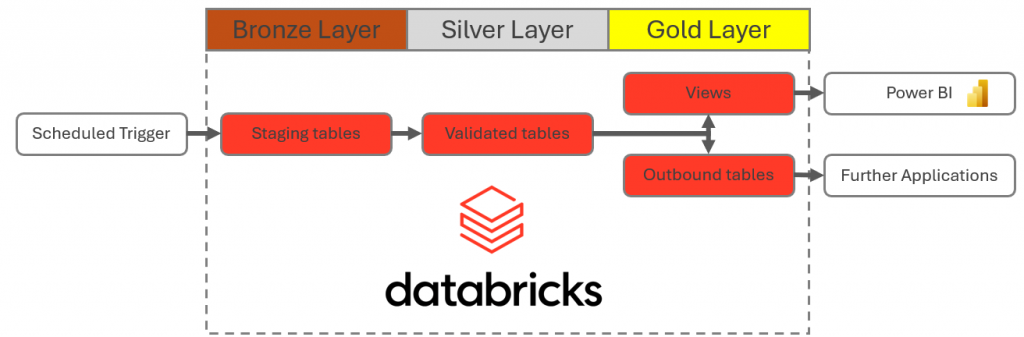
- bronze for basic format validations
- silver for more complex validations and derivations
- gold for enduser reporting as well as deliveries to other systems
From the response of the API request we extract the content and use pySpark to cast to the correct data type per column and write to the bronze tables. During the load from the bronze to the silver layer we perform validations, transformations and derivations, based on customizable building blocks.
By joining the HFM security classes with metadata tables in the silver layer, we dynamically derive security roles. In the gold layer data is aggegated for reporting and security classes mapped to to actual roles. When combined with Databricks Unity Catalog, allowing for Row-Level Security (RLS). This ensures that a user from the French branch only sees French data, even if the underlying table contains the entire global dataset.
Conclusions
By automating the bridge from HFM to Azure Databricks, we have moved beyond manual Excel exports to a modern, secure, and “live” data landscape. With the financial statements, as well as currency conversion rates and metadata information on dimensions available via Databricks Unity Catalog, the organization is now equipped to build state-of-the-art reporting applications and make data-driven decisions with confidence.